
This guide is essential for those seeking to better understand and analyze the revenue generated by specific events. It provides a clear overview of sales, as well as detailed reports that break down crucial information on tickets, statuses, locations and payment types. By following this process, users can make informed decisions based on accurate, visual data.
1. Select the Reports dropdown and click on “Revenues per event”.

2. Choose the date you consider.

3. A detailed overview of the events and the sales of each event is displayed here.
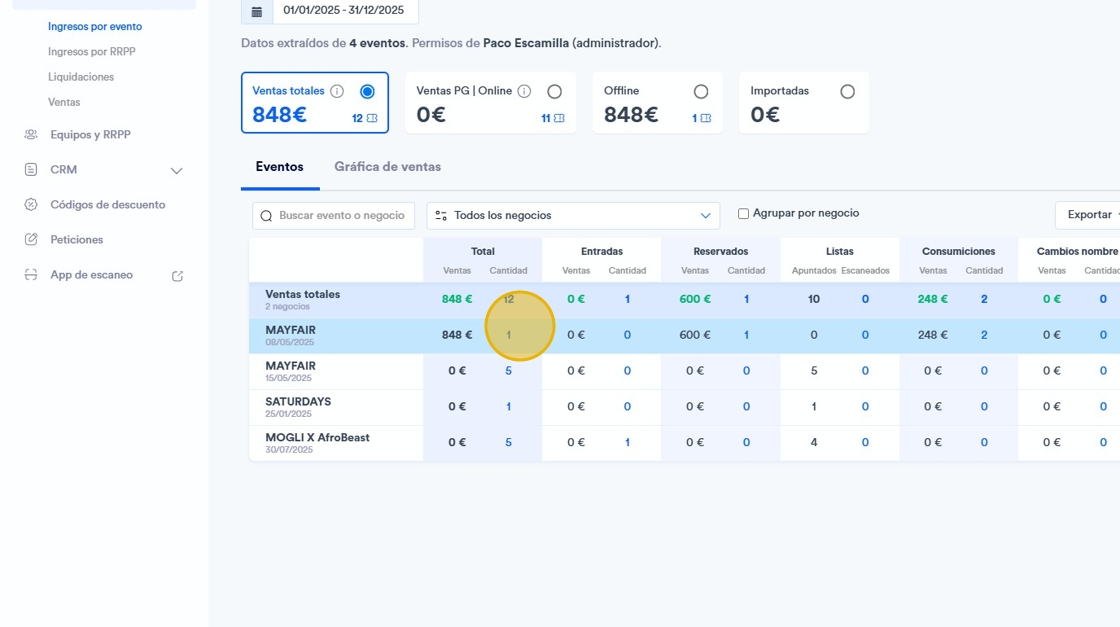
4. If you click on the specific event, you will find a much more detailed report of the tickets. Including the statuses in different colors and location, price or payment type.
