
This guide provides a simple process for redeeming gift vouchers on the website, ensuring a hassle-free experience for customers. It outlines the steps involved in selecting dates, filling in information and verifying voucher details, making it easy to understand how to use the gift effectively. By following this guide, users can confidently navigate the booking system and enjoy the benefits included in their gift vouchers.
1. When a customer wants to redeem a gift voucher they simply go to the website, select the date they want to go along with the time of the reservation.
They must also select the option: ¨I have a gift voucher¨.

2. You will fill in your data.

3. Click here to redeem the code.

4. Enter the code and click on redeem.

5. The correct code and what is included in the promotion is shown.

6. You can also answer these questions to ensure you have a comfortable experience.

Tip: In CoverManager it will appear as follows:
7. Click on the day of your choice.

8. Click to open the reservation.

9. In the reservation screen the code will appear and also in the observations it will appear that you have a gift voucher. If you call or book by phone you can also add the number manually.

10. To see what includes this gift certificate, click on the card.

11. This screen displays the code in question and details of the product.
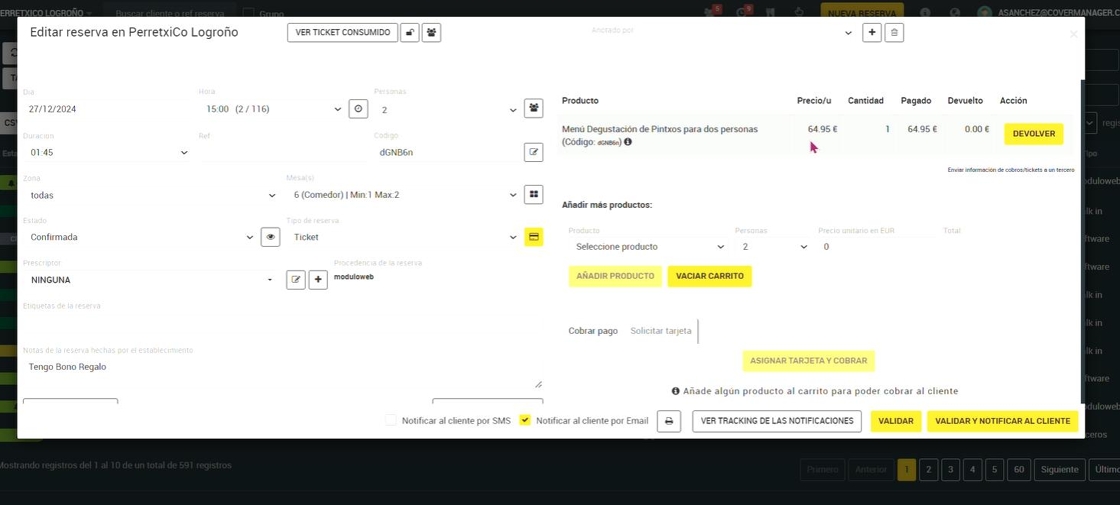
12. This would be the preview of the reservation from the redeemable code, it appears with a red ticket in the listing and in the product you will see what is included.
