
1. Click on the “user” icon in the top right corner and click on “Settings”.

2. Click “Customer Experience”.

3. Click "Landing pages".

Reconfirmation and cancellation Landing Page
4. Click “yes” to allow the customer to add a comment on the cancel or reconfirm booking landing page.

5. Click “yes” to set the logo in the header of the cancellation/reconfirmation landing page.

6. In edit reconfirmation landing page, you can modify both the footer and the reconfirmation header.

7. Click “Edit Template” to modify it.

8. Here it is modified:

9. When you have modified it, click on “SAVE”.

10. Here you can add a CSS code to customize the cancellation/reconfirmation landing page.

Landing page On The Go
11. Here you must select the language.

12. Click on the link to open the ON THE GO registration page.

13. This is the view the customer has when scanning the QR code to sign up for ON THE GO.

14. Here you can customize whatever you want.

Group Landing
Tip: By having group slug:
15. You can choose whether include restaurant in the group landing or not.
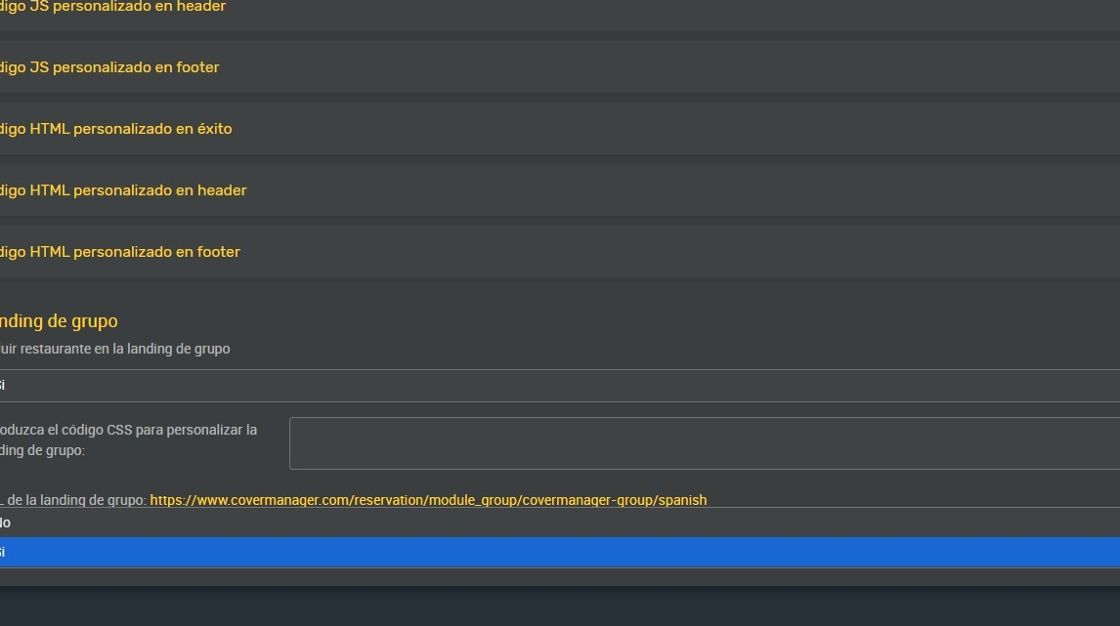
16. Here you can enter the CSS code to customize the group landing page.

17. Click on the link to see the group landing.

18. This would be the group landing:

19. Click “SAVE”.
