
This guide provides essential instructions for setting up reservation cancellation policies, enabling users to manage their bookings efficiently. By following these steps, users can customize cancellation conditions, including penalties and conditions, ensuring clarity and flexibility in managing their bookings.
Tip: Bookings made with cancellation policy will be free of charge. When making the booking, the customer provides his credit card information. An amount will be charged to the client's account in case of no-show or last minute cancellation.
1. Click on the “user” icon in the upper right corner and click on “Settings”.

2. Click "Booking type".

3. Click "Cancellation policy".

Tip: In the booking settings, you decide when and from how many people to apply the cancellation policy.
4. Select the maximum time to be able to cancel free of charge.

5. Here you will write the penalty per person. For example: 198€ per person
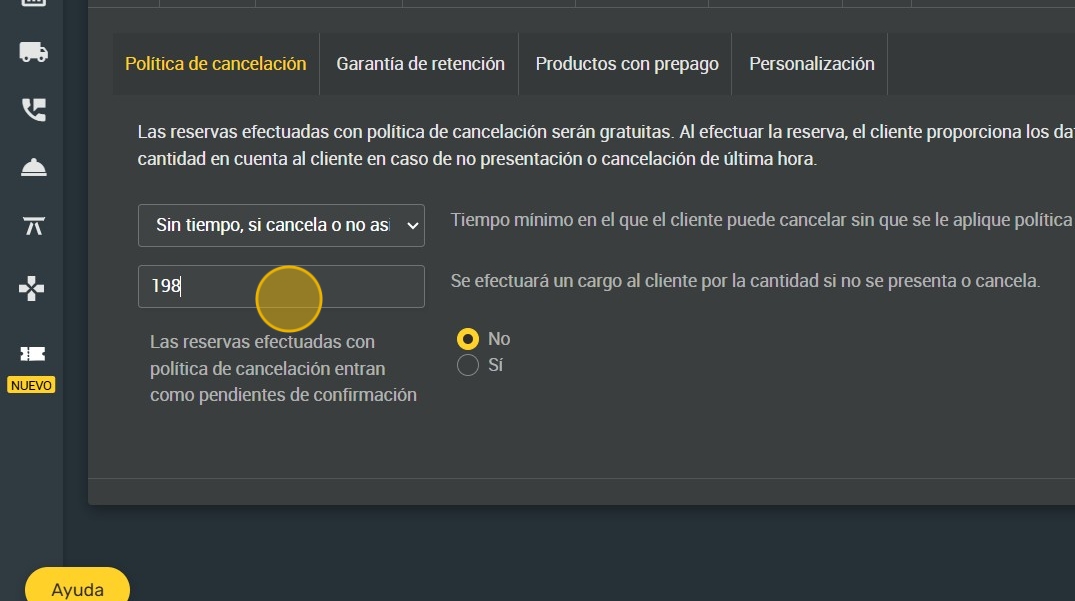
6. You can also choose whether all bookings with cancellation policy enter as pending confirmation.

7. Click "SAVE".
