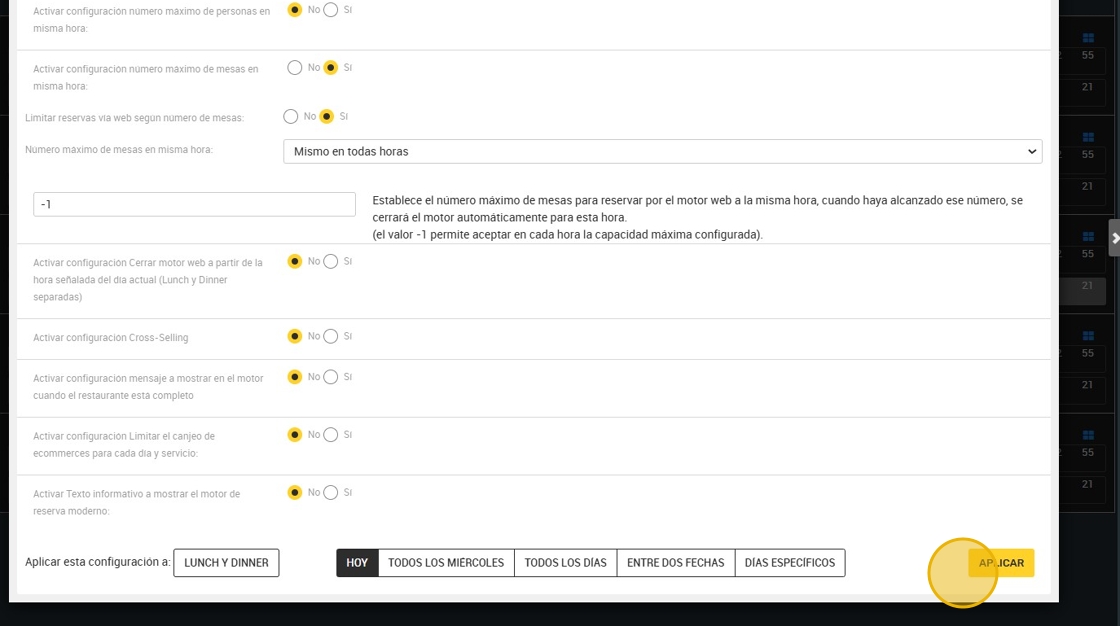
This guide provides a simple method for setting the maximum number of table bookings at one time, allowing you to manage your restaurant's capacity effectively. It offers flexibility to set limits for different times and days, ensuring that your service can meet demand without overbooking. By following these steps, you can customize your reservation settings to suit your specific needs.
1. Click “9. Special configurations”.

2. The configuration will affect the maximum number of tables in reserve. To set a limit press “yes”.

3. Click here to limit reservations through the web engine channels.

4. You can set the same at all times.

5. Here the amount you consider.
-1 means no limit.

6. You can also adjust it differently according to time, if your service needs it.
A line like this will appear, summarizing the limits you have selected as well as the times you have done so.

7. At the bottom you will find the option of how often you want to apply this rule.
You have several application options according to your preferences:
A. The same day (today).
B. "Every Wednesday¨: here you can select one or more days of the week where you want to apply the settings. For example; Tuesday, Thursday and Friday.
C. "Everyday”.
D. Between two dates: for example the configuration is from November 22nd to December 22nd.
E. Specific days.
- Press “apply” to save the data.