
This guide provides detailed instructions for setting up special configurations to display informative text during specific periods, enabling tailored communication for bookings. By following the steps described, users can customize messages for specific days or times, enhancing the booking experience.
Tip: These settings apply in settings for all days, in general the information text we have in settings will appear. In special configurations, we can set an informative text for a specific period.
1. Click on the “configuration” icon.

2. Click "Bookings".

3. Click on the day and time you wish to apply the settings.

4. Click "9. Special configurations".

5. Click “Yes” to activate informative text to display in the web engine.
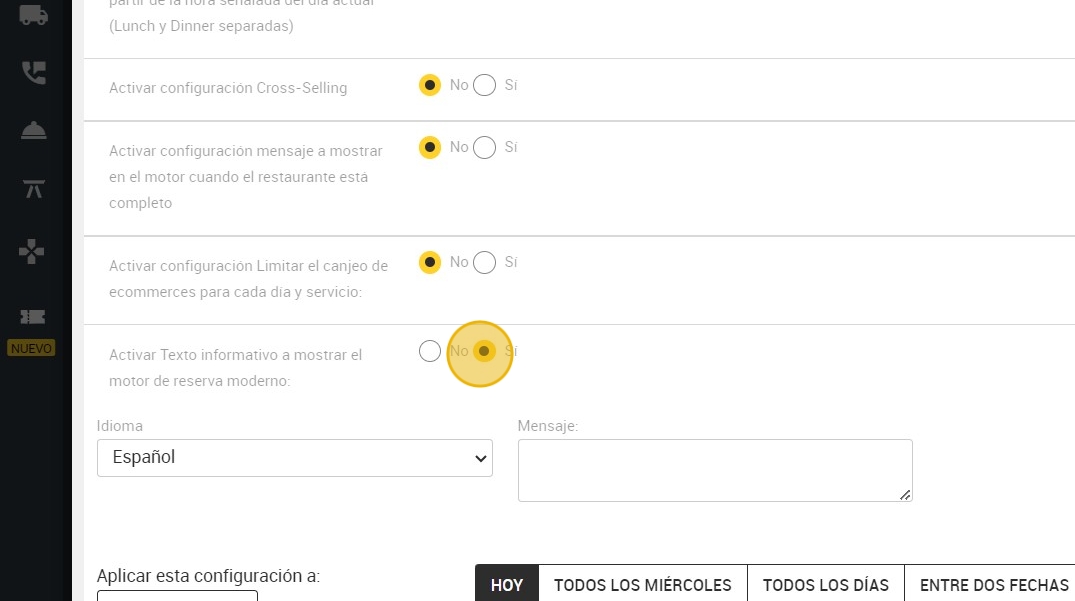
6. Here you can write the message you want to display.

7. You can select to apply this setting to “LUNCH AND DINNER”.

8. You can also choose between different time variables to activate the informative text to be displayed:
A. Same day (today).
B.¨Every Wednesday¨: here you can select one or more days of the week where you want to apply the configuration. For example; Tuesday, Thursday and Friday.
C. "Every day”.
D. Between two dates: for example the configuration is from November 22nd to December 22nd.
E. Specific days.

9. In this case, you can apply it between two specific dates.

10. Click "APPLY".
