
This guide is essential to optimize tag management in your CRM, allowing you to combine duplicate tags and improve efficiency in customer search. By unifying tags with the same meaning, you simplify the organization of your database, making it easier to access information. In addition, the process is simple and straightforward, ensuring that you can quickly implement improvements to your customer management system.
1. Click on the face on the left to open “CRM”.

2. Click “Tag Manager”.

3. Scroll down the page to the bottom and click on “Unify tags”. This is to combine duplicate tags with the same meaning into a single tag, making it easier to find and manage your customers.

4. Select or search for the tags you want to unify.

5. Once you have selected them, select the tag to which you will unify all the previous ones.

6. Click on the button “UNIFY TAGS”.

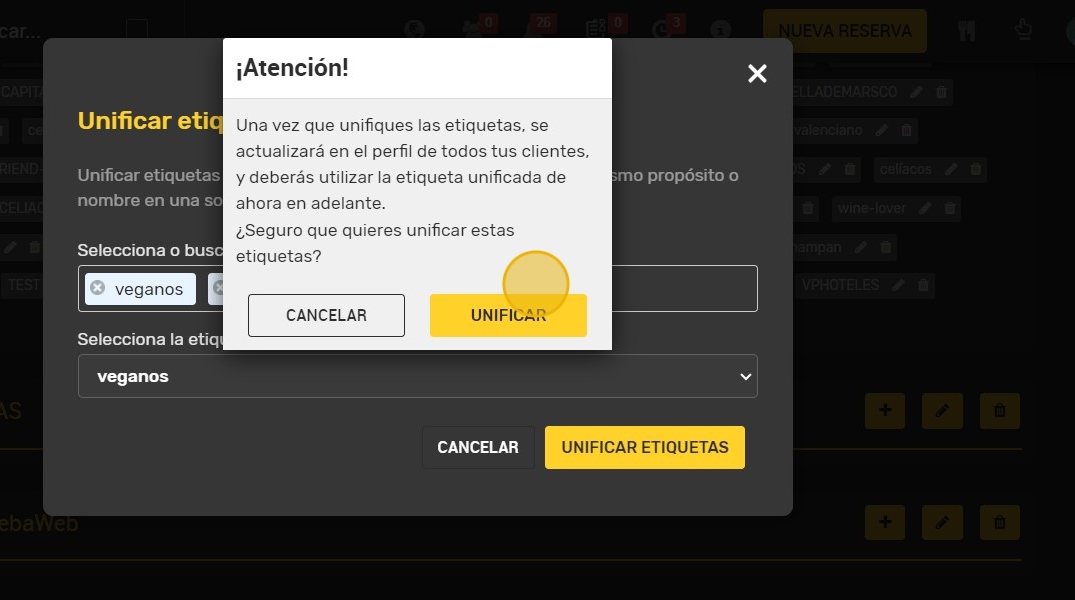
7. In the confirmation message, click on “UNIFY”.
Tip: VERIFY THE UNIFICATION: CHECK THE CUSTOMER LIST AND VERIFY THAT THE TAGS HAVE BEEN UNIFIED PROPERLY